
How to Make a Dame Hombro AI Dance Video from One Photo
Make a Dame Hombro AI dance video from one person or pet photo. See the upload steps, the price per video, task status, and how to save the MP4 on your phone.
To make a Dame Hombro AI dance video, open the Dame Hombro effect page, sign in, choose Person or Pet, upload one clear photo, and select Create my Dame Hombro video. The result is a 15-second vertical 9:16 MP4 in 480p with audio. Each task uses one video allowance from a paid pack. The standard one-video pack costs US$9.99; larger packs lower the price per video. Check current pack prices before checkout.
See the existing examples
These are existing person and pet samples from the effect page. Results can vary.
Existing Dame Hombro AI sample made from a person's photo.
Prepare one photo
Choose one clear, well-lit photo showing a single adult or pet. Keep the face and body visible; full-body works best. Upload JPEG, PNG, or WebP files up to 10 MB. Convert HEIC or resize larger files before uploading.
Use your own photo, one of an adult who agreed to this use, or a pet you own or have permission to feature. Celebrity photos are not accepted. Read the upload consent notice before continuing.
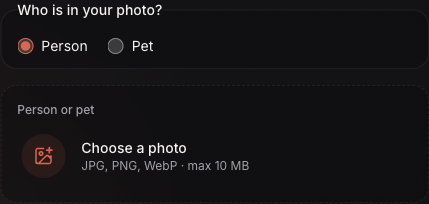
Choose Person or Pet, then add one photo in the labeled upload area.
Make the video step by step
- Open the effect and sign in. Go to Dame Hombro AI. Uploading requires an account. If needed, choose Sign in to add, then return to the effect.
- Choose the subject type. Select Person or Pet to match the photo.
- Upload one photo. Select Choose a photo and choose one image from your device. Wait for the upload and check the preview; replace the image if it is blurry, too dark, or shows multiple subjects.
- Check your allowance. Each task uses one video allowance. If your balance is too low, the creator opens a purchase window for a one-time pack. Check the total at checkout. Buying a pack adds allowances but does not submit a generation. After the page confirms your balance, return to the creator.
- Submit the task. Select Create my Dame Hombro video. If the status is uncertain and the button changes to Retry, use it to check the same request. You can also check My videos. Wait for the first request to resolve before starting another task, which uses another allowance.
- Check progress and download. The task may show Queued and Processing. Wait times depend on the queue. You can leave and check My videos later; when ready, select Download to save the MP4.
The finished video includes audio. Movements and details can vary. This AI result is separate from the official music video and street clip. For the song, read what “Dame Hombro” means.
Save the video on your phone
Your browser may save the MP4 to Downloads instead of Photos or Gallery.
iPhone with Safari
Open Safari's Downloads list or Files → Browse → Downloads. Safari may use iCloud Drive or On My iPhone. See Apple's instructions for finding iPhone downloads and choosing Safari's download location.
Android with Chrome
Open Chrome's menu and select Downloads, or look in your device's Files app. See Google Chrome's instructions for Android downloads.
Quick answers
Can I use a pet photo?
Yes. Choose Pet and upload one clear photo of a single pet you own or have permission to feature.
How much does one video cost?
The standard one-video pack costs US$9.99. Larger packs lower the price per video; check the pricing page for current totals.
Which photo formats are supported?
JPEG, PNG, or WebP files up to 10 MB.
What does the finished video include?
A 15-second vertical 9:16 MP4 in 480p with audio. Movements and visual details can vary.
What happens if a task fails?
A confirmed failure returns the used allowance to your balance. It does not refund the pack payment to your card. If the status is uncertain, check My videos or use Retry on the existing request before starting another task.